Enable AI Assistants to Access Enterprise Data Safely
Full visibility, policy control, and compliance for AI-to-app interactions.
Complete AI Governance
Everything you need to enable AI assistants while maintaining security and compliance.
Observe
Centralized logging proxy for every AI-to-enterprise-app interaction. See exactly what your AI assistants are accessing in real-time.
Real-time streamingEnforce
Policy engine for access control, rate limiting, and approval workflows. Block, modify, or allow based on your security rules.
Zero standing accessConnect
Pre-built connectors for Microsoft 365, Salesforce, Slack, and more. 5-minute setup with enterprise-grade security.
15+ connectorsConnect Your Enterprise Apps
Pre-built connectors for the tools your teams already use.
Three Steps to Secure AI Access
Get complete visibility and control over AI-to-enterprise-app interactions.
Connect
Connect your enterprise apps in minutes with our pre-built connectors. OAuth setup with least-privilege permissions.
- SharePoint, OneDrive, Salesforce
- OAuth 2.0 + certificate auth
- 5-minute setup
Configure
Define policies to control what AI assistants can access. Set rules based on data sensitivity, user roles, and actions.
- Policy-as-code
- Role-based access
- Custom conditions
Govern
Monitor every AI interaction in real-time. Block unauthorized access, generate audit logs, and stay compliant.
- Real-time monitoring
- Automatic blocking
- SIEM integration
Enterprise AI Security, Visualized
Get complete visibility into how AI assistants interact with your enterprise data. Monitor, control, and secure every interaction.
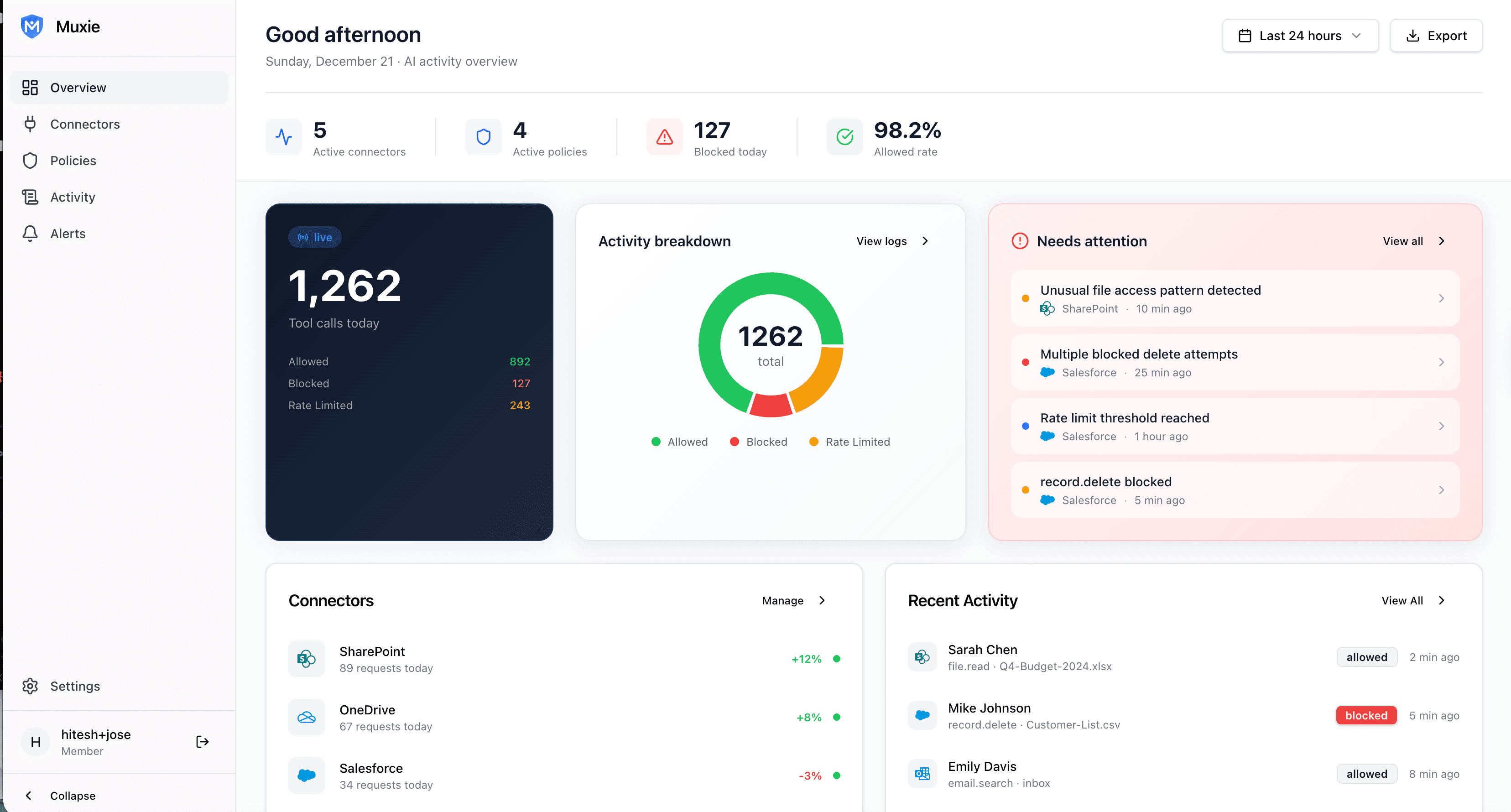
Real-Time Command Center
Monitor every AI interaction with your enterprise data as it happens. See 1,262+ tool calls today, activity breakdowns by outcome, and instant alerts when something needs attention. Complete visibility into AI behavior across your organization.
- Live activity counter with allowed/blocked/rate-limited breakdown
- Activity breakdown donut chart by connector
- Instant "Needs Attention" alerts with investigation links
- Per-connector request trends and health status
Least Privilege Setup
Configure connector permissions following Microsoft best practices. Our wizard guides you to the minimum required scopes—Sites.Selected, Files.Read, User.Read—while clearly warning against risky permissions like Sites.Manage.All.
- Visual risk badges: minimal, low, medium, high, critical
- Recommended vs. Not Recommended sections with rationale
- One-click enable/disable for each Graph API scope
- Real-time security posture feedback

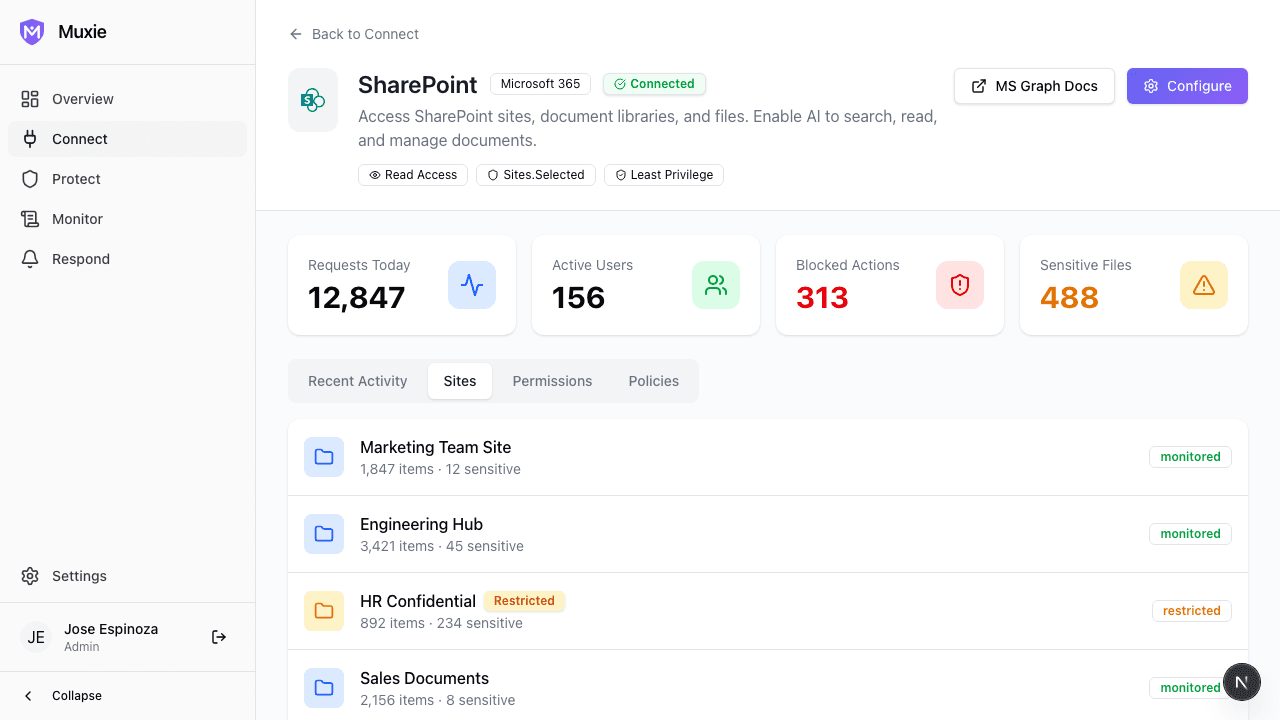
Surgical Site Selection
Choose exactly which SharePoint sites AI assistants can access. Sites.Selected means surgical precision—AI can only see the sites you explicitly approve. Sensitive sites like HR and Finance show warning badges.
- Per-site selection with item counts and sensitive file detection
- "Sensitive" badges for high-risk sites (HR, Finance)
- Sites.Selected scope limits access to approved sites only
- Everything else is denied by default
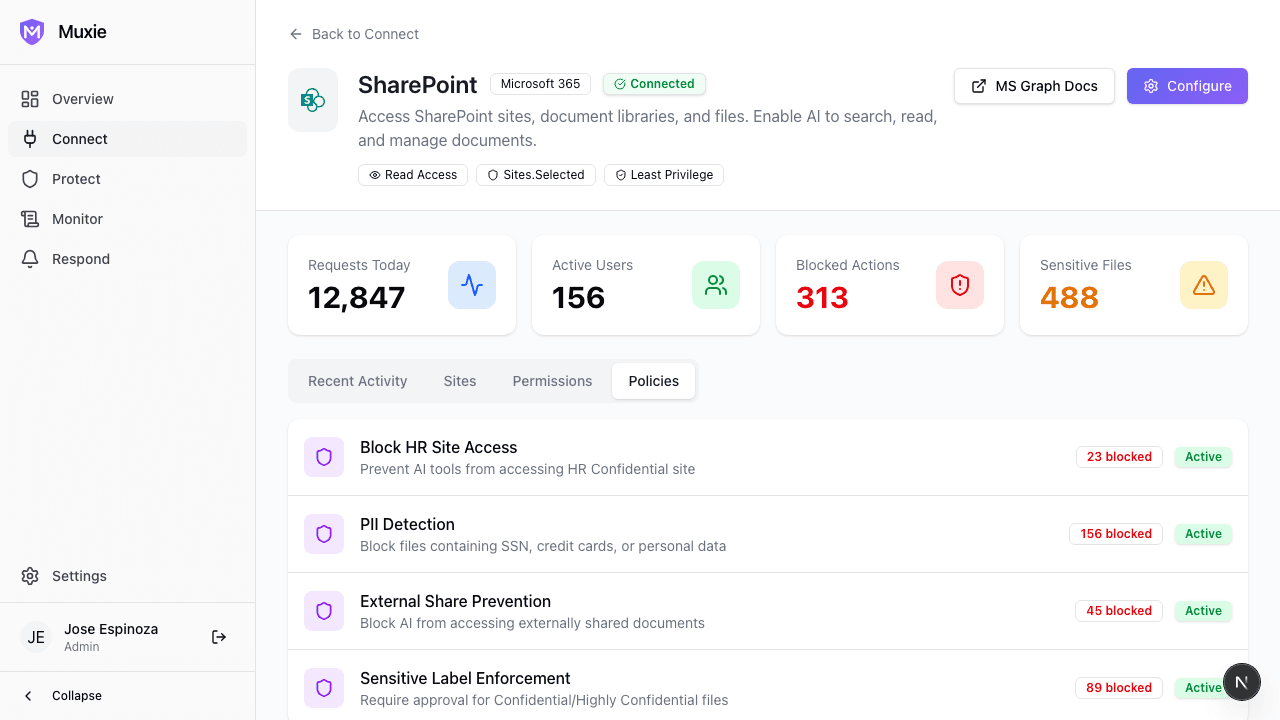
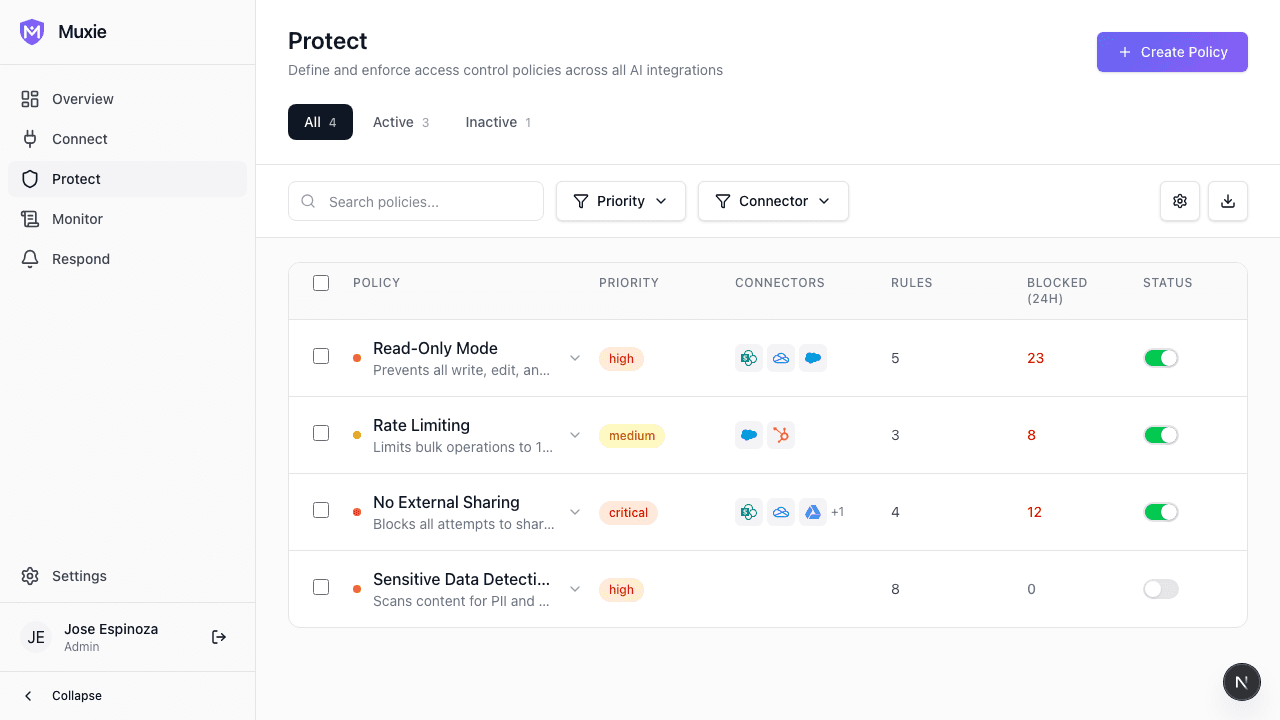
Security Policies
Configure what AI tools can and cannot do with your data. Pre-built policies like Read-Only Mode, External Share Prevention, and Approval Workflows are enabled by default. Start secure, loosen only where needed.
- Block Restricted Sites: Wall off sensitive areas completely
- Read-Only Mode: AI can read but never write or delete
- External Share Prevention: Block AI from sharing externally
- Approval Workflow: Human approval for confidential files
MCP Tool Control
See every MCP tool AI assistants can invoke—list_sites, read_file, write_file, delete_file. Enable safe operations, disable dangerous ones. Click any tool to inspect its full specification: parameters, scopes, risk level.
- Tool-level on/off switches with instant effect
- Risk badges: low, medium, high, critical
- Dangerous operation warnings with automatic disable
- Full MCP spec inspection: parameters, return types, scopes

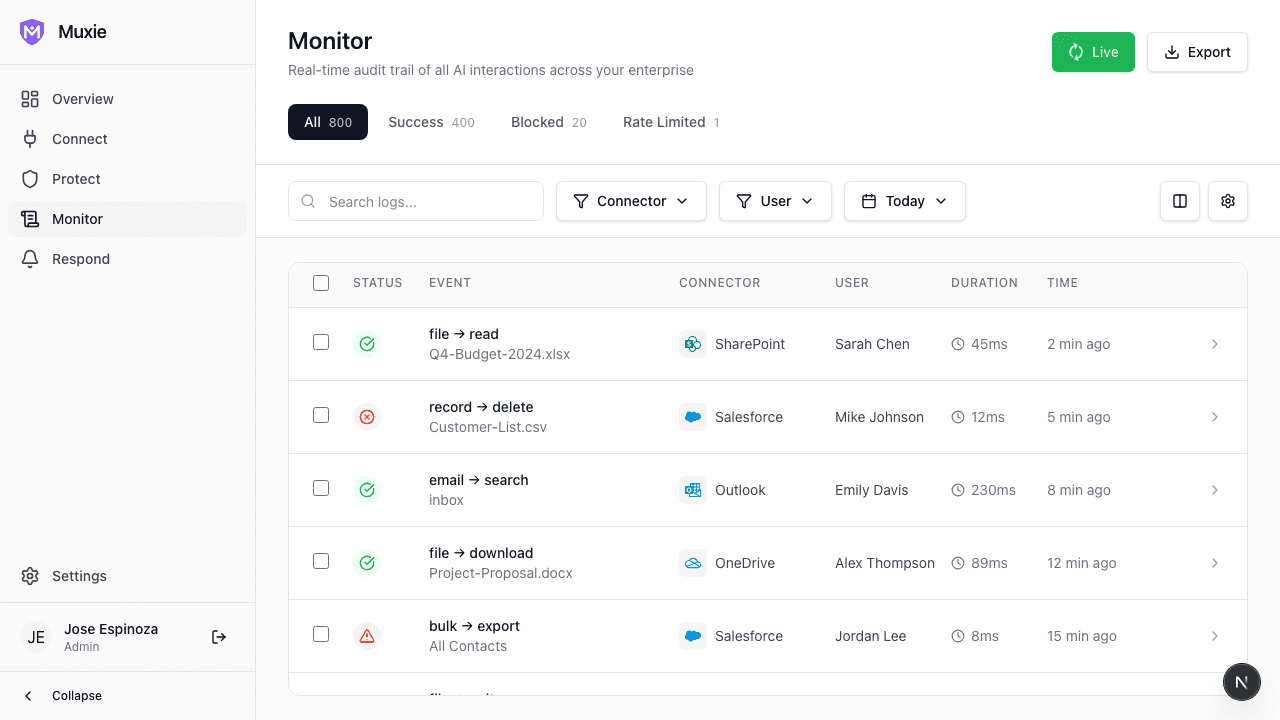
Complete Audit Trail
Every action logged. Every access recorded. Full compliance-ready audit history that satisfies the most demanding regulatory requirements. Export to your SIEM in real-time.
- Immutable audit logs for compliance
- Real-time log streaming to Splunk, Sentinel
- Advanced search and filtering capabilities
Policy-Based Control
Define what AI can access. Block sensitive data automatically. Create granular policies that enforce least privilege access without slowing down your teams.
- Granular access control by user, role, or data type
- Global vs connector-specific policy scoping
- Least privilege enforcement out of the box
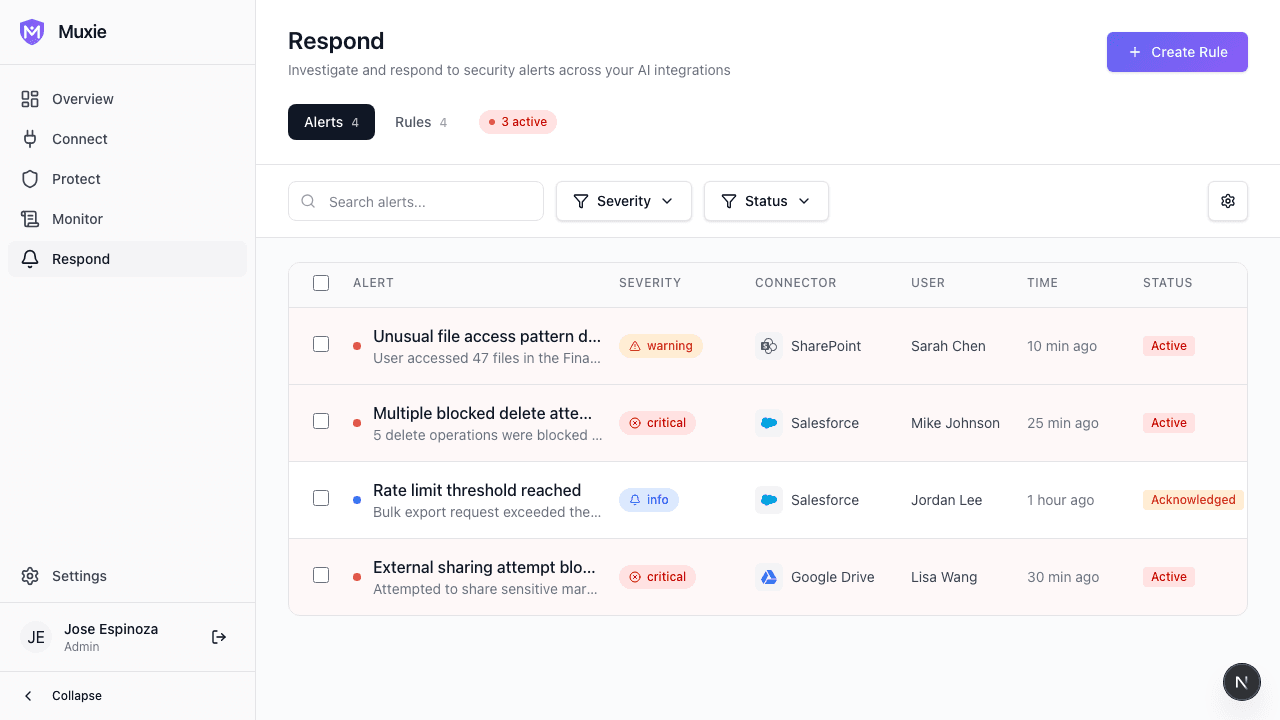
Intelligent Alerts
Get notified when something unusual happens. AI-powered anomaly detection identifies threats before they become incidents. Suggested actions help you remediate quickly.
- AI-powered anomaly detection
- One-click remediation actions
- Integration with incident management tools
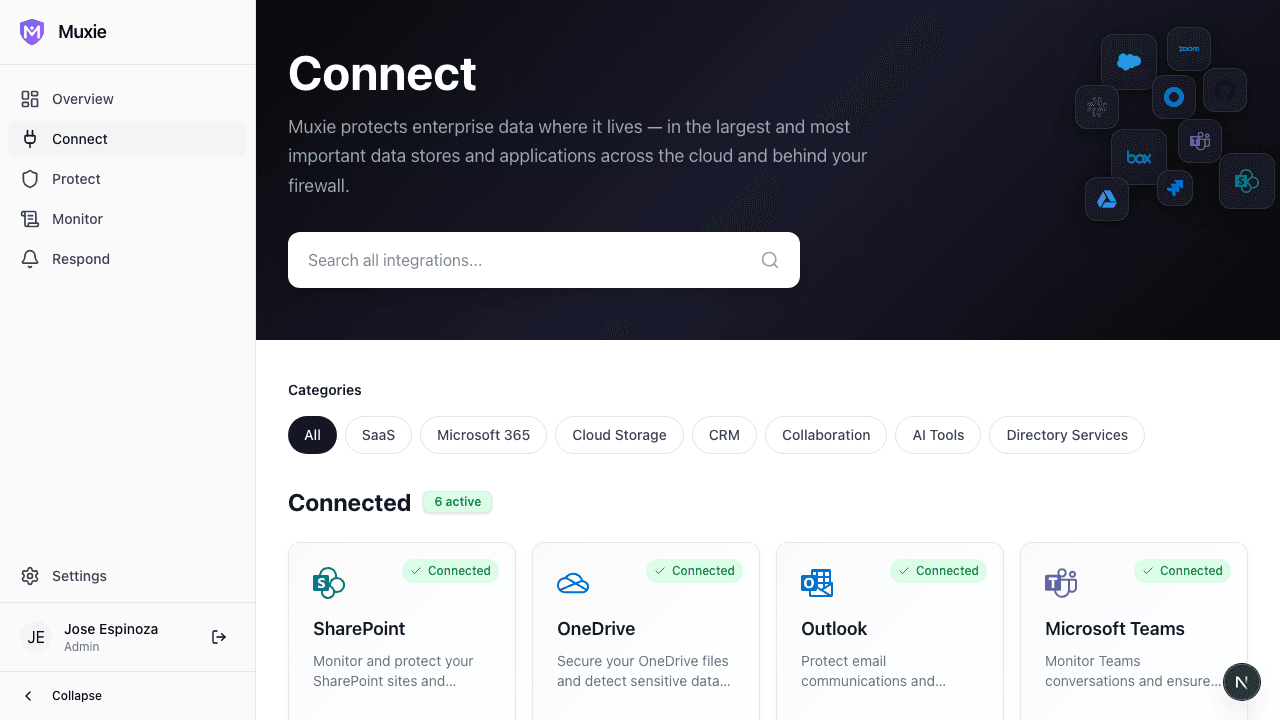
15+ Enterprise Connectors
SharePoint, Salesforce, Slack, GitHub and more. Pre-built connectors that work out of the box. Connect your entire enterprise ecosystem in minutes, not months.
- Pre-built connectors for popular enterprise apps
- OAuth and API key authentication supported
- Automatic schema discovery and mapping
Want to see more? Explore the full interactive demo.
Explore Interactive DemoBuilt for Enterprise Trust
Muxie is designed from the ground up for enterprise security requirements. Your data never leaves your control.
- End-to-end encryption for all data in transit and at rest
- Zero standing access — AI only gets permissions when needed
- Complete audit trail for every interaction
- Enterprise SSO and RBAC support
Muxie is a product by Astellent, a leader in enterprise AI governance and security solutions.
SOC 2 Type II
Certified
GDPR
Compliant
HIPAA
Ready
Ready to Secure Your AI Assistants?
Get full visibility and control over what AI tools can access in your enterprise. Start with a free trial or request a personalized demo.
No credit card required // Enterprise plans available